 Kilnframe Desktop
Sequences
A project can hold several timelines, called sequences: the long video, a vertical copy, a short clip. They share the same media.
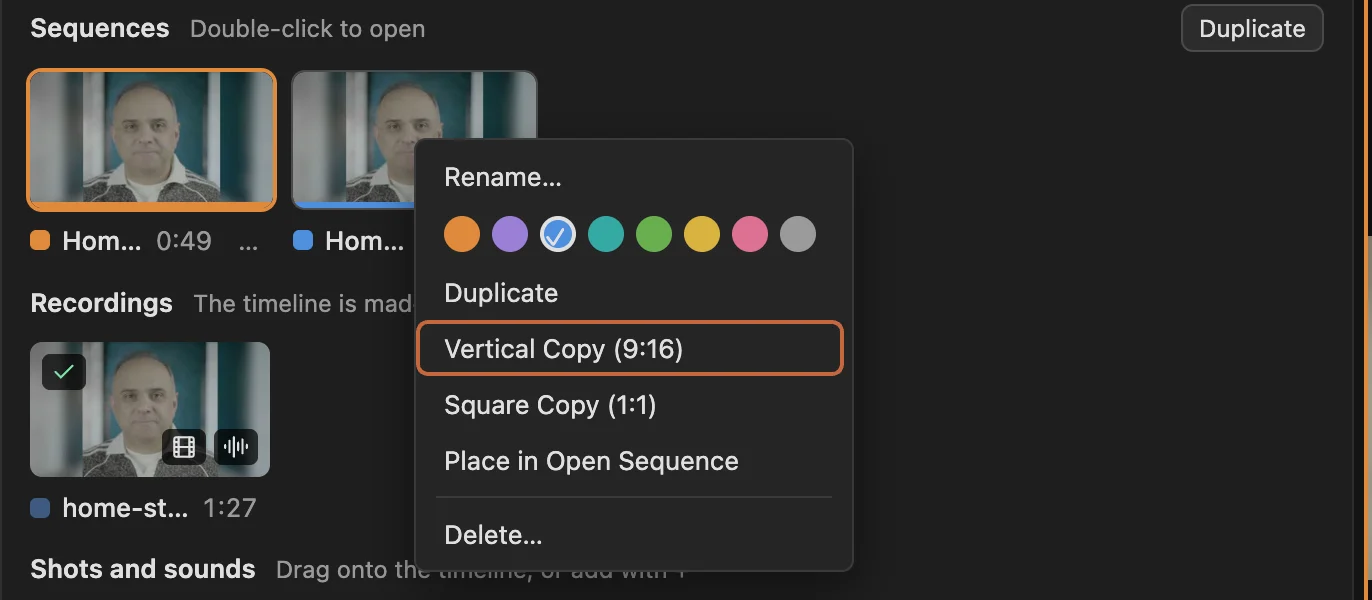
Make and open sequences
In Media › Sequences, double-click one to open it. The menu beside each has:
- Duplicate: a copy of the open sequence.
- Vertical Copy (9:16) and Square Copy (1:1): the same cut in another shape.
- Rename…, a colour and Delete…. A deleted sequence can come back from History.
Short clips saved from the Publish tab become sequences too (Short clips).
A sequence inside another
- Place in Open Sequence puts a sequence in the one that is open, at the playhead.
- On the timeline, select clips and choose Make Compound Clip to fold them into one; Break Apart unfolds it.
- Open Sequence on a nested clip opens it; the bar above the timeline shows the path back.
- A nested sequence shows Render to preview until Render Preview prepares it. The export prepares it by itself.
Nesting goes up to 4 levels deep.